Compare two columns in Google Sheets
Use this one-step tool to compare two columns on a single Google sheet. It detects duplicates and unique values that you can easily highlight with the selected color, mark in a status column, copy/move to another place or delete.

Tip. You'll find this tool in all our collections: Compare Sheets, Remove Duplicates and Power Tools.
Before you start
Hidden & filtered rows
Please keep in mind that the add-on processes values in hidden & filtered rows as well.
Compare columns from multiple sheets?
If you want to match columns from multiple sheets or analyse multiple tables, use Compare Sheets for Duplicates instead.
How to use Compare Columns
Start the add-on
You'll find this tool in all our collections: Remove Duplicates, Compare Sheets and Power Tools.
Run the owned collection from the Extensions menu:
- The fist two will feature Compare columns right in the menu:

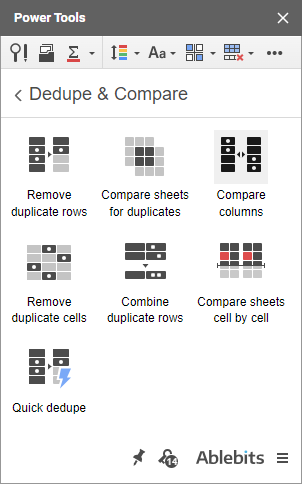
- While Power Tools will have it located in the Dedupe & Compare group:
Fine-tune its settings
There's just one window with all the necessary comparison options:
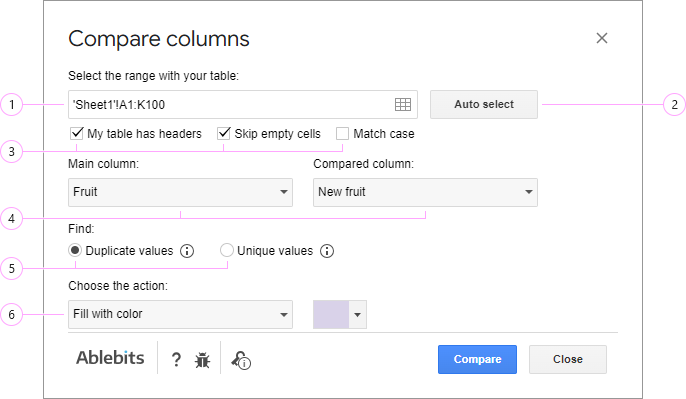
- Once you run the add-on, it automatically detects your whole table (based on the selected cell that is). You can enter another range right in this field.
Note. You must enter the range containing at least 2 neigboring columns. If you pick the whole table, you'll be able to choose any 2 columns from it for comparison in Google Sheets, of course.
- Click the Get selection icon to automatically insert the range that is currently selected in your spreadsheet into the field.
- Click the Select range icon to open a dialog box:
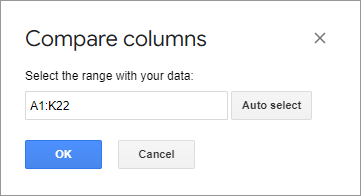
The dialog box allows you to pick your data in different ways:
- Enter the range in the Select the range with your data field using your keyboard.
- Pick a cell in the table and click the rectangle icon to select the entire table (up to the first empty row and column).
- Highlight the necessary cells and click the Get selection button to auto-insert the range.
Select the necessary cells and click OK to confirm the reference.
- Use the Auto select button to detect the range with your data automatically. It works as Ctrl+A shortcut: expands the range from the selected cell to the entire used range (till the first empty column and row on the way).
- Use these 3 checkboxes to control the data that should be included to the column comparison:
- The 1st one is for when your selected range has headers. Use it to skip column names. Otherwise, the first row will be also checked against another column.
- Set up the same for any blanks in the columns. Check the box to skip empty cells or ignore the setting to match blanks as well.
- Match case will not just compare values from 2 columns in Google Sheets but also see if their text case matches. Identical records written in different text cases will be considered unique.
- Select those two columns you'd like to compare. The add-on will show duplicate or unique values in the main column.
- Pick the type of values you'd like to find:
- Duplicate: those that appear in both columns.
- Unique: those that occur in the main column BUT another one.

- Duplicate: those that appear in both columns.
- Choose what to do with the found values:

- Color them with the selected hue.
- Add a status column to the right of the main one:

- Copy them to another location: new sheet, new spreadsheet, or a custom location (the cells of your choice within the current file).
- Move them to a new sheet, or a new file, or specific cells in the same spreadsheet.
- Delete entire rows from the sheet including cells outside your selected range.
- Delete cells and shift data up only in the main column.
- Clear values from cells in the main column without shifting or removing other data.
Hit Compare to start comparing two columns in Google Sheets.
See the result
When the add-on is done, you'll see a confirmation message saying how many duplicate or unique values have been colored and how they've been handled:

Please contact us here