Solve 300+ daily tasks in Excel
Ablebits Ultimate Suite for Microsoft Excel 365, 2024 – 2016
If you are looking to improve your efficiency in Excel, Ultimate Suite is the perfect solution for you. With this collection of 70+ professional tools and 300+ helpful features, you can accomplish any task quickly and flawlessly. Whether you’re merging, splitting, comparing, or cleaning your data, you’ll find an ideal solution for it.
Why waste time on routines that can happen in a mouse click? Speed up your work with Ablebits!
Free download- Safe to download - Verified Windows Installer
- Works with Excel 365 - 2016
- 14 days free - no card or email needed
Merge, combine, and consolidate
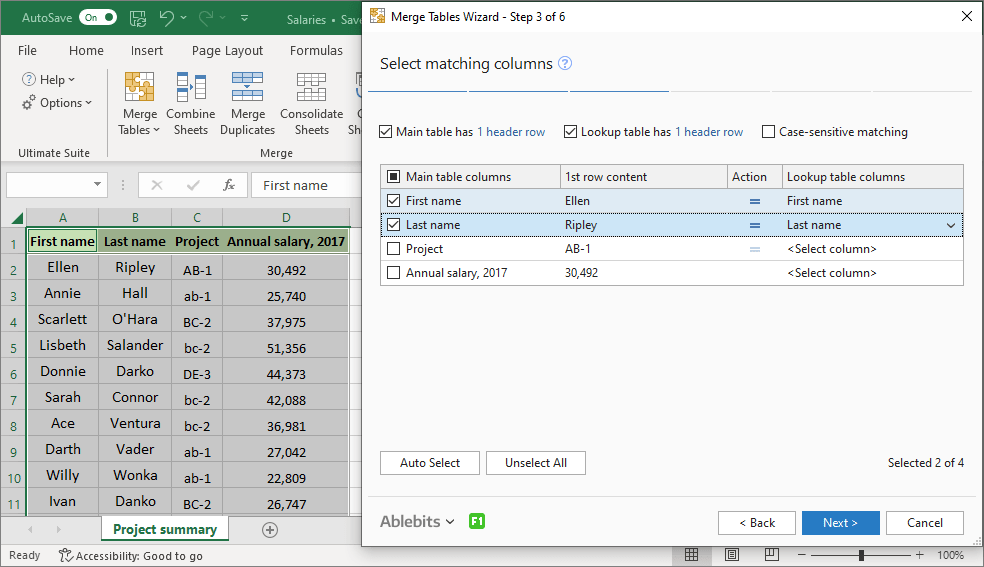
Matching and merging data without specialized tools might be a nightmare in Excel. Ultimate Suite covers various types of merging—from joining individual cells to consolidating multiple workbooks—all to relieve you of the formidable task.
- Pull matching data from another table
- Merge multiple tables
- Combine columns from different worksheets
- Combine or aggregate rows by duplicate values
- Consolidate and summarize worksheets
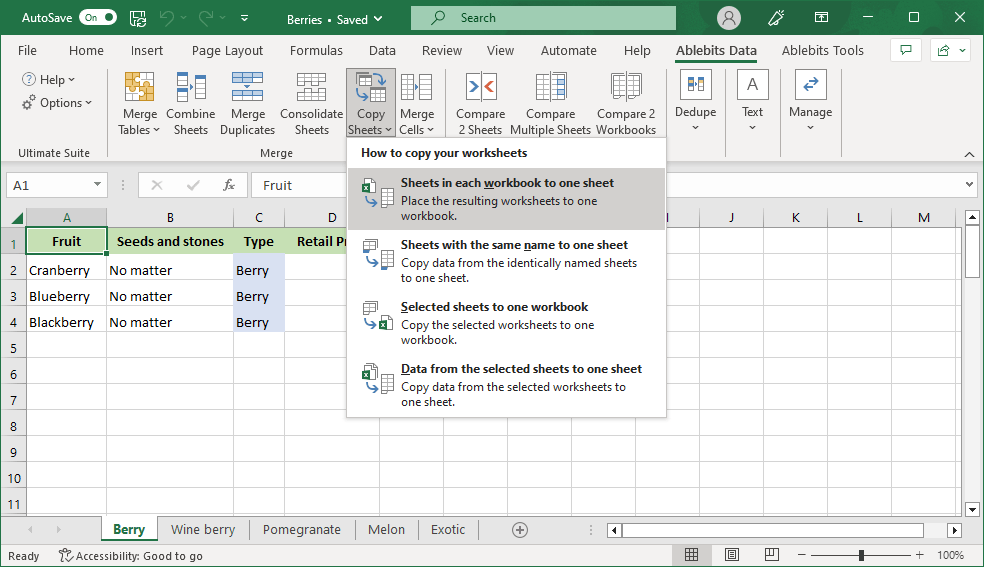
- Copy several sheets into one
- Join several cells keeping all data
- Add VLOOKUP or INDEX/MATCH formulas with ease




Compare sheets and workbooks
Three tools to compare Excel sheets and workbooks: compare two worksheets side by side, several worksheets at once, or identically named sheets in two Excel files.
- Search two worksheets for differences
- Compare sheets with the same name in two workbooks
- Get differences marked in several worksheets
- Use any combination of colors you like to spot the differences


Find duplicate and unique values
If your data is littered with duplicates you want to get rid of, Ultimate Suite can offer you several helpful tools. Powerful and versatile, they're ready to use so that you can find and delete all the duplicates in one fell swoop.
- Look for duplicates and uniques your table has
- Dedupe your table easily
- Compare two tables by the selected columns
- Find all duplicate cells in a range
- Remove duplicate substrings
- Get fuzzy duplicates identified


Enjoy text tools
Sort out the problem of messy text data in Excel with a collection of tools designed to clean, convert, and transform text quickly and accurately.
- Remove extra spaces and line breaks
- Change case to UPPER, lower, Proper, or Sentence
- Add any text to the selected cells by position
- Insert characters before or after the specified text
- Extract substrings by position or length
- Extract digits from text data
- Cut off characters by their position in text
- Remove special symbols and punctuation marks
- Replace line breaks with any other characters
- Split cells by characters, masks, or strings
- Get multi-part names divided
- Use regexes to find matching text strings


Manage your workbooks
Make your life easier with nifty tools for managing columns, worksheets, workbooks, and watermarks.
- Move, insert, or rename sheets across workbooks
- Create and use text watermarks
- Turn pictures into watermarks
- Insert, move, autofit, and delete columns
- Find and select columns with ease
- Create a table of contents on a separate worksheet


Create and edit formulas
Creating and editing long formulas goes smoothly with the tree view available in the Formula Editor tool. Enjoy syntax hints, keyboard shortcuts, and trouble-free formula copying.
- Build and correct your formulas in the most convenient way
- Choose between the Compact and Cosy styles of displaying a formula


Simplify date, time, and age calculations
Everything you need to calculate dates, times, and ages in Excel, pick dates from a pop-up calendar, and convert text to dates.
- Build complex formulas with an easy-to-use tool
- Add or subtract years, months, weeks, and days
- Get the difference between dates counted
- Calculate age for today or any other date
- Turn text strings into dates
- Convert text values containing dates and time


Transform and reshape
Work wonders with the Transform tools and painlessly unpivot tables, transpose, flip, or swap ranges, split tables and workbooks, or manage blanks.
- Convert a summary table into a flat list
- Create cards or address labels
- Split tables by key columns or by every N rows
- Divide a workbook into separate worksheets
- Transpose and merge data by key columns
- Convert rows into columns, and vice versa
- Swap ranges within a sheet or between two sheets
- Flip your range top to bottom
- Flip your range left to right
- Remove empty rows, columns, and worksheets
- Divide multi-part names into their components
- Fill blank cells with the above or below values


Search, select, and replace
Find and replace whatever you think should be corrected in your worksheets. Fix broken links, manage typos, select cells either with the same value or with the same font or background color, and use filters to keep your data accurate.
- Search in values, formulas, comments, and hyperlinks
- Perform search in a range or in a sheet
- Replace all found values or just the selected ones
- Look for typos thoroughly
- Select cells with text, numeric, or logical values
- Select cells that have comments or objects
- Get cells with conditional formatting selected
- Filter your data by the selected values
- Find and inspect broken links
- Synchronize selection in all the workbooks that are open


Calculate by colors or across multiple sheets
Handle calculations that Excel doesn't support out of the box with specialized tools for calculating colored cells and working across worksheets.
- Get SUM, COUNT, AVERAGE, etc. for cells with a particular font or background color
- Use either one or all cell colors for calculations
- Decide where to place the calculation results
- Apply various functions to the same cell or range in many worksheets
- Edit the same cell across multiple worksheets
- Count all or specific characters in a column


Speed up your Excel routine
Take the hassle out of repetitive Excel tasks with a set of utilities that automate common jobs like generating random data, spelling numbers, converting cell references, and working with notes.
- Get random integers, dates, and logical values
- Generate random values from custom lists
- Mix alphanumeric strings of any length or pattern
- Get cells, columns, or rows shuffled easily
- Select cells, rows, or columns randomly
- Spell numbers with or without currency labels
- Eliminate leading zeros if necessary
- Paste pictures horizontally or vertically
- Copy cell addresses as references
- Convert formulas to values with the click of a mouse
- Insert pictures into your notes
- Convert cell contents into notes, and vice versa


Over 150,000 happy users!
20 latest reviews from our customers
Fantastic software, fantastic support
Fantastic Software, Fantastic support. I have been using for the last 5 years. I'd guess I've saved about 6 months of my life by using Ablebits! Don't sit on the fence - It's worth the money all day long. If you value efficiency, this is a must buy.
Ablebits goes above and beyond to deliver upside to your day-to-day workflow
From a long-time customer. Recently upgraded to the latest Ultimate Suite version. The products are exceptional -and- customer service is always on point. The Ablebits team goes above and beyond to deliver upside to your day to day workflow.
Ablebits has been a Lifesaver in My Role
I have been using Ablebits for many years. It has helped me tremendously when doing data merging and analytics. The customer service team responds quickly and is helpful. I've recommended Ablebits to my other colleagues as well!
The best set of tools available
I have been using the Ablebits Excel addins and the Ultimate Suite for many years. THIS IS THE BEST set of tools available. The support team is also the best. Even though they are in Europe and I am in USA, they always respond quickly with the correct answer.
I’ve used different versions of this add‑in for close to a decade
I’ve used different versions of this add‑in for close to a decade, and it remains one of the best time‑saving tools I’ve ever had for data wrangling. I highly recommend it—especially if you want to get more out of Excel without memorizing formulas. It works through a series of intuitive “wizards” or guided workflows that make complex tasks incredibly simple.
Practical Every Day Use
As a school administrator, I have to organize data from different sources in a quick manner. Ablebits’s Excel Suite allows me to complete task efficiently and effectively. Their customer support is always helpful when I have a request or need.
What would normally take hours in Excel can be done in minutes with Ablebits
I’ve been using Ablebits for several years now, and it’s one of the most useful Excel add-ins I’ve ever used. It simplifies tasks like merging data, removing duplicates, comparing spreadsheets, and cleaning up large datasets. The interface is easy to use, and the tools are very practical for real-world data work. If you spend a lot of time in Excel, this program will save you a significant amount of time and frustration. I highly recommend it.
These addins save me hours of manual work every week
After 15 years of daily use, I can confidently say that Ablebits offers the most comprehensive tools for Excel. These add-ins save me hours of manual work every week. The value for money is unbeatable, and the customer support is the best in the business. Once you integrate these into your routine, you’ll wonder how you ever managed without them.
New to Ablebits and very satisfied
I am new to Ablebits but it has made my work flow in Excel very manageable and the tools I use for the Excel reports are outstanding, I would recommend the software to everyone who works with multiple Excel reports to create one master report, I merge a lot of data from different worksheets and other agencies data and it works like a charm.
Can't recommend them enough - brilliant product and company
Ablebits Ultimate Suite for Microsoft Excel is my favourite area of Excel - really functional tools that I use virtually every day. Ablebits the company has fantastic Customer Service - very responsive and comprehensive help with issues that I may encounter.
This tool is truly exceptional
This tool is truly exceptional. The support team is incredibly responsive and has always answered my questions. I’ve been using this tool for over 10 years, and I appreciate that it never stays stagnant. The company consistently improves the product and continues adding valuable features to support all users. Highly recommended.
Ablebits is an AMAZING tool with great Customer Service!
Ablebits is an AMAZING tool, well worth it! Saves so much time and we don't even use half of the available tools! Support is great too, very quick to respond. Friendly, great service and a great product!
Ablebits is a lifesaver and their customer support is wonderful
I'm perfectly content with creating macros, but this plugin just makes life so much easier. Ran into only one issue ever that was pretty much my fault and customer support responded quickly and helped me out!
This is a wonderful addition to Excel
This is a wonderful addition to Excel! It makes the simplest spreadsheet task so much easier and has an in-app UI to help you do what you need. The customer support is phenomenal as well. I reached out to them due to a licensing issue and got a human reply in less than 24hours. Highly recommended for any professional that uses Excel. I'm a System Administrator!
Ablebits is Truly Indispensable
Ablebits offers some of the most comprehensive and cost-effective tools available for Microsoft Office. I have used Ablebits for the Excel Suite for 8 years because these add-ins are truly indispensable. I use it every day! It saves me SO MUCH time and significantly boosts my productivity. Their support team is outstanding—highly responsive, knowledgeable, and consistently willing to go above and beyond to help.
I’ve used the AbleBits add-in for a number of years
I've used the AbleBits add-in for several years and it's made my life in Excel easier. Its table tools are spot on, allowing me to find discrepancies in Power Query results. The product support is exemplary! I have receive quick responses to the small issues I've had and have been treated graciously. I highly recommend this product.
Can't do my job well without Ablebits
Can't do my job well without Ablebits, saves me so much time. And AI can't do the formulas that Ablebits can. On top of that their service support is super.
Where has this been all my life?
Where has this been all my life? This program is amazing! It's saved me time and headaches! So easy to use, and so versatile ~ it is truly a magic wand.
Love it!
I use Merge Table Wizard religiously, cannot live without it. As an analyst, data is key & this is VLOOKUP on speed. Customer Service is prompt & exceptional.
Over and above the Excel add-in
Over and above the Excel add-in, after sales service, when needed, is superb. No two ways about it. As for the Ablebits Addin for Excel, you will not find any better elsewhere. Pricing suits what you get, and it is a bargain at best.
8 reasons to get Ultimate Suite
Awesome benefits you’ll really like
One Suite. 300+ spreadsheet problems solved
Stop wasting hours on repetitive spreadsheet tasks. Whether you need to merge complex tables, clean up messy data, or spot hidden duplicates, you get 70+ powerful tools that turn tedious tasks into a single click.
Zero learning curve
The Ultimate Suite looks and feels like a native part of Excel. There is no clunky interface to learn – just a seamless, frustration-free experience that works perfectly on any monitor size or display resolution.
Pay once, own it forever
Escape the subscription trap. Make a single payment and get lifetime access to the software version you purchased, plus any versions you become eligible for during two years of free updates. No hidden fees. No recurring annual charges.
100% risk-free for 30 days
Put it to the test on your toughest, messiest spreadsheets. If our tools don't save you hours of manual work, simply let us know within 30 days and we’ll refund every penny. No questions asked.
Lifetime access to human support
Software is only as good as the team behind it. Your license includes lifetime support from real Excel experts. Whether you have a quick licensing question or need help tackling a complex data merge, we’ve always got your back.
Master it in minutes
Hit the ground running on day one. You get instant access to end-to-end video tutorials, quick-reference cheat sheets, and step-by-step guides so you can start automating your work immediately.
Universal compatibility
No need to upgrade your system. Ultimate Suite integrates flawlessly with every modern environment, fully supporting Windows 7 through Windows 11, and all Excel versions from 2016 up to Microsoft 365.
Effortless deployment at any scale
Install it in seconds for yourself or let your IT team roll it out silently to hundreds of enterprise workstations using standard SCCM and GPO deployment.
Stop letting manual Excel tasks drain your energy. Leave the daily grind to Ultimate Suite.
Get started now- Safe to download - Verified Windows Installer
- Works with Excel 365 - 2016
- 14 days free - no card or email needed
Ultimate Suite components
70+ professional tools, 300+ use cases
Merge
- Merge Single Table with Several Lookup Tables
- Merge Several Tables with Single Lookup Table
- Vlookup Wizard
Compare
Dedupe
Text
Manage
Formulas
Date and Time
Transform
Search
Calculate
Utilities
100% Human Support
No chatbots. No endless AI loops. Just real Excel experts.
System requirements
 Microsoft Excel
- Excel included in Microsoft 365 (formerly Office 365)
- Excel 2024
- Excel 2021
- Excel 2019
- Excel 2016
- Note! Office Insider is not supported
 Windows
- Windows 11 on PCs (x86)
- Windows 11 on Copilot+ PCs (x86 and ARM)
- Windows 11 on Macs (Parallels, Intel and Apple M)
- Windows 10
- Note! Windows Insider is not supported
Choose your Ultimate Suite edition
- 2 - 10 licenses: 5% discount
- 11 - 25: 10%
- 26 - 50: 15%
- Over 50: Contact us for details
| Personal | Business | Business, 5 seats | |
|---|---|---|---|
| License for | Single user, up to 2 computers | Single user, up to 5 computers | 5 users, 5 computers per user |
| Support for Excel 365, 2024 – 2016 All Excel versions 2024 – 2016 are supported, both 32- and 64-bit. Also, all desktop Excel versions included in Microsoft 365 subscriptions. |
✓ | ✓ | ✓ |
| Technical support service Our support team is always happy to help you via email, live chat, or phone no matter how long ago you purchased your license. |
✓ | ✓ | ✓ |
| Free upgrades During 2 years after the purchase you get all minor updates and major upgrades for free. |
2 years | 2 years | 2 years |
| Can be installed without admin rights Business edition does not require admin rights; it is installed in the CurrentUser\AppData folder. Personal edition requires administrative rights to install. |
✓ | ✓ | |
| Corporate deployment (GPO, SCCM) Your system administrator can quickly and easily deploy Ultimate Suite for a group of users without even disturbing them. |
✓ | ✓ | |
| Features and hotfixes on request We’ll do everything in our power to create additional features you need and fix the found bugs as soon as possible. |
✓ | ✓ | |
You can choose currency in the next step. |
$49 Buy now |
$99 Buy now |
$399 Buy now |
Your order will be processed by 2Checkout (Verifone Payments BV)
We use the e-commerce service provider 2Checkout (Verifone Payments BV) to process your order and collect payment. Get a formal quote Place a Purchase Order (PO) Purchasing FAQ
50% discount for charities
For charities, we offer a 50% discount from the regular price. To get your discount, please contact us using your organization's email address.